


When (and How) to Use Firmware Recovery in DYNAMIXEL Wizard 2.0
Posted by Mason Knittle on 8th Jan 2026
If you work with DYNAMIXEL actuators long enough, chances are you’ll eventually run into a motor that won’t respond, won’t scan, or behaves… weirdly. Before you assume the hardware is dead, there’s an important tool you should know about:
Firmware Recovery in DYNAMIXEL Wizard 2.0.
This post explains what firmware recovery is, when you should use it, and how to do it safely using DYNAMIXEL Wizard 2.0.
What Is Firmware Recovery?
Firmware recovery is a process that re-flashes the actuator’s firmware when normal communication is no longer possible.
Unlike a standard firmware update (which assumes the motor is healthy and responsive), firmware recovery is designed for “bricked” or semi-bricked devices—actuators that:
- Don’t show up during scans
- Don’t respond at their configured ID
- Fail during a firmware update
- Have corrupted or mismatched firmware
- Think of it as an emergency reset at the firmware level.
When Should You Use Firmware Recovery?
You should consider firmware recovery if any of the following apply:
✅ Use Firmware Recovery When:
- A firmware update was interrupted (power loss, cable unplugged, app crash)
- The actuator no longer responds to pings or scans
- The actuator shows up with an unknown model or invalid firmware
- Communication settings (baud rate / protocol) are unknown and unresponsive
- The motor behaves erratically after a failed configuration change
❌ Do Not Use Firmware Recovery When:
- The actuator is responding normally
- You only need to change an ID, baud rate, or operating mode
- A regular firmware update works fine
- Firmware recovery is powerful - but it’s not something you want to run “just in case.”
What You’ll Need Before Starting
Before you begin, make sure you have:
- DYNAMIXEL Wizard 2.0 installed
- A supported U2D2 or USB communication device
- A stable power supply (this is critical)
- The correct DYNAMIXEL model selection
- A direct connection (avoid hubs or long chains during recovery)
How Firmware Recovery Works (High-Level)
Firmware recovery puts the actuator into a special recovery mode and re-installs firmware from scratch.
At a high level, the process looks like this:
- Launch DYNAMIXEL Wizard 2.0
- Connect your communication device (e.g., U2D2)
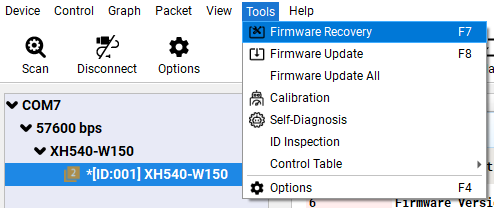
- Open the Firmware Recovery tool
- Select the correct DYNAMIXEL model
- Follow the on-screen instructions to initiate recovery
- Wait for the firmware to be written and verified
- Power-cycle the actuator when prompted
DYNAMIXEL Wizard 2.0 will guide you step-by-step, so follow the prompts carefully and don’t rush.
Tips for a Successful Recovery
Here are a few practical tips that can save you a lot of frustration during firmware recovery: disconnect any other DYNAMIXEL actuators so you don’t accidentally target the wrong device, and always double-check the model number before starting, since flashing the wrong firmware can make the situation worse. Be patient throughout the process—firmware recovery often takes longer than a normal update and interrupting it can cause problems. Only try different baud rates if the recovery process specifically instructs you to do so, rather than guessing randomly, and if the recovery fails unexpectedly, restarting DYNAMIXEL Wizard 2.0 can help, as the software itself may occasionally need a reset.
After Recovery: What to Check
Once recovery is complete:
- Scan for the actuator again
- Confirm:
- ID
- Baud rate
- Protocol version
- Test basic movement or torque enable
- Reapply your project-specific configuration
In many cases, the actuator will return to default settings after recovery, so don’t be surprised if IDs or modes reset.
Final Thoughts
Firmware recovery can feel intimidating, but it’s an essential skill for anyone working seriously with DYNAMIXEL actuators. Used correctly, it can save hardware, time, and money, and turn a “dead” motor back into a fully working one.
If you’re experimenting with firmware updates or pushing your actuators in custom setups, knowing how and when to use firmware recovery is a must.